Presentation Template - Music: Elevating Your Event and Creative Pitch
Creating a compelling visual narrative for the music industry requires a delicate balance between artistic expression and professional clarity. Whether you are organizing a concert, pitching a new record label startup, or showcasing a photography portfolio centered on live performances, the visual medium you choose sets the tone before a single note is played. The Presentation Template - Music is designed specifically to bridge this gap, offering a structured yet highly creative framework for professionals who need to communicate auditory concepts through visual slides. This resource is not merely a collection of backgrounds; it is a comprehensive toolkit tailored for creative agencies, event organizers, corporate profiles, and personal portfolios that demand a distinct aesthetic.
Addressing Common Design Challenges in the Music Industry
Professionals in the music and entertainment sectors often face unique hurdles when preparing presentations. Standard corporate templates frequently feel too sterile for creative pitches, while overly abstract artistic designs can lack the structure necessary for business proposals or event logistics. When introducing a music event or presenting a company profile to investors, stakeholders need to see both the vibe and the viability. A primary challenge is maintaining brand consistency across dozens of slides without spending hours formatting individual elements. Additionally, non-designers often struggle with creating data visualizations that fit a musical theme; standard bar charts and pie graphs can look out of place against a dark, moody concert backdrop.
The Presentation Template - Music addresses these friction points by providing a pre-engineered design system. It eliminates the guesswork involved in color matching, font pairing, and layout balancing. For event planners, the challenge is often conveying the atmosphere of an upcoming show to sponsors or venue owners. This template provides the visual vocabulary needed to translate sound into sight, ensuring that the excitement of the music is palpable even in a static document. By solving these foundational design problems, users can focus their energy on refining their message and strategy rather than wrestling with alignment tools and image cropping.
Core Features That Drive Practical Outcomes
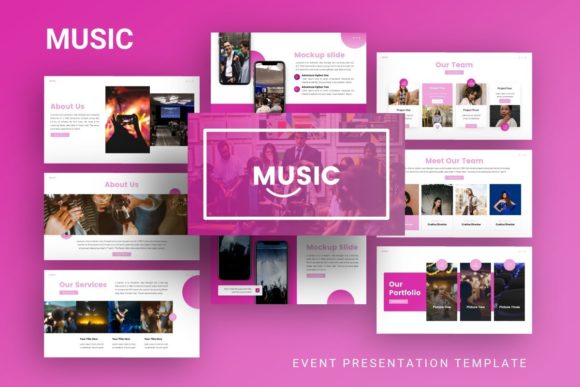
Functionality must accompany aesthetics for a template to be truly useful in a professional setting. This template includes 35 distinct slides for each variation, providing ample coverage for every section of a typical pitch deck or event introduction. From title slides and team introductions to complex timelines and budget breakdowns, the variety ensures that users do not have to create custom layouts from scratch. Crucially, the content is easily customizable. The template is built on Master Slides, meaning global changes to fonts, colors, or logos can be applied across the entire presentation instantly. This feature is invaluable for agencies managing multiple clients or events where branding guidelines shift frequently.
Visual communication is further enhanced through handcrafted infographics integrated directly into PowerPoint. These are not generic stock vectors but are designed specifically to complement the musical theme. All graphics are fully resizable and editable, allowing users to adapt visual metaphors to their specific data points. Furthermore, the inclusion of pixel-perfect illustrations and picture placeholders with drag-and-drop functionality streamlines the workflow. Users can simply drop their own high-resolution concert photography or artist headshots into designated frames, maintaining the integrity of the layout without needing advanced graphic design skills. The package also includes vector icons and documentation, ensuring that even first-time users can navigate the customization process efficiently.
Practical Applications Across Different Sectors
The versatility of the Presentation Template - Music extends far beyond simple concert promotion. Its robust structure makes it suitable for a wide array of professional scenarios. Creative agencies can utilize the template to pitch marketing campaigns for artists, using the dynamic layouts to showcase mood boards and campaign timelines. For startups in the audio tech space, the clean yet edgy design serves as an excellent foundation for investor pitch decks, helping to differentiate the brand in a crowded market. Corporate businesses within the entertainment sector can use it for internal reporting or partner profiles, adding a layer of industry-specific relevance to standard business communications.
Photographers and videographers specializing in music events will find the portfolio layouts particularly beneficial. The template’s emphasis on imagery allows visual work to take center stage, with text serving as a supportive element rather than a distraction. Personal portfolios for musicians, producers, or sound engineers also benefit from this structure, providing a professional way to present discographies, tour histories, and press kits. In each of these applications, the template acts as a flexible container that adapts to the user's specific goals while maintaining a cohesive thematic identity.
Tailoring the Experience to User Needs
Different users will approach the Presentation Template - Music with varying levels of expertise and distinct objectives. A seasoned designer might use the master slides as a starting point, deconstructing the layouts to build something entirely new while retaining the core asset library. Conversely, an event coordinator with limited design experience may rely heavily on the pre-built infographic slides and drag-and-drop photo frames to assemble a polished deck in under an hour. Understanding your own workflow is key to maximizing the value of this resource.
For those introducing a music event, the priority should be on emotional impact. Utilize the full-bleed image slides and bold typography to generate excitement early in the presentation. Reserve the data-heavy infographic slides for the logistical sections regarding ticket sales projections or marketing reach. For corporate or agency users, the approach should be more restrained. Use the musical elements as accents rather than overwhelming features, ensuring that the business case remains the focal point. Customizing the color palette to match specific client branding is essential here; the template’s master slide architecture makes this transition seamless.
Implementation Tips and Important Considerations
To get the most out of this template, users should begin by reviewing the included documentation file. This guide explains the organization of the master slides and provides tips for editing vector elements, preventing common frustration points during the customization process. It is also important to note that all images shown in the demo are for preview purposes only and are not included in the download. Users must source their own high-quality imagery to achieve similar results. Investing time in selecting professional-grade photography is crucial, as low-resolution images can undermine the premium feel of the template.
When customizing the handcrafted infographics, ensure that the data visualization accurately reflects your metrics. While the graphics are aesthetically pleasing, they must remain functional and truthful. Resize elements proportionally to avoid distortion, and utilize the included vector icon set to maintain visual consistency if you need to add new categories or points. Finally, always test your presentation on the actual display equipment you will be using. Colors and contrast can vary significantly between screens, especially with darker, music-themed designs. By approaching the Presentation Template - Music as a strategic tool rather than just a decorative skin, professionals can create presentations that resonate deeply with their audience and effectively support their business or creative objectives.