Evaluating Presentation Template - LaunchUp for Startup and Business Needs
Selecting the right visual framework is a critical step in communicating business value, yet it often becomes a bottleneck for entrepreneurs and corporate teams. The Presentation Template - LaunchUp enters this space as a versatile solution designed specifically for high-stakes environments like pitch decks, company profiles, and creative portfolios. Unlike generic slide decks that prioritize aesthetic novelty over structural utility, LaunchUp focuses on the functional requirements of modern business storytelling. Understanding where this template fits within the broader ecosystem of presentation resources requires looking beyond surface-level design and evaluating its technical architecture, customization depth, and suitability for specific professional scenarios.
Core Architecture and Technical Specifications
When comparing presentation assets, the underlying construction often matters more than the preview images. LaunchUp is built upon a Master Slide system within PowerPoint (.PPTX), which distinguishes it from templates that rely on grouped objects or locked layers. This architectural choice has significant practical implications for users. Changes made to a master slide propagate throughout the deck, allowing for global adjustments to color palettes, typography, and logo placement without the need to format individual slides manually. For teams managing multiple versions of a pitch deck or updating quarterly reports, this feature reduces administrative friction and ensures brand consistency.
The template includes 36 distinct slides per variation, providing a comprehensive library of layouts. This volume strikes a balance between sufficiency and bloat; it offers enough variety to cover data visualization, team introductions, product showcases, and financial projections without overwhelming the user with unused assets. Crucially, the infographics are handcrafted directly in PowerPoint rather than imported as static images. This means charts, graphs, and diagrams remain fully editable vector elements. Users can adjust data points and resize graphics without experiencing pixelation or losing editability, a common limitation in templates that rely on pre-rendered PNGs or external software dependencies.
Visual Fidelity and Asset Management
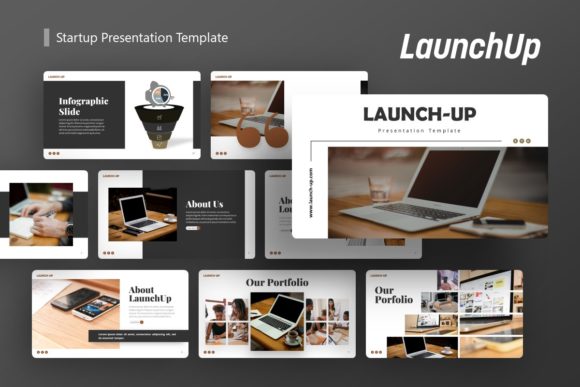
A frequent point of frustration with digital assets is the discrepancy between marketing previews and actual deliverables. It is important to note that all photography seen in the LaunchUp demo is for preview purposes only and is not included in the downloadable files. While this is standard industry practice due to licensing restrictions, it requires users to have their own image assets ready. The template compensates for this by utilizing intuitive picture placeholders with drag-and-drop functionality. This workflow streamlines the process of inserting proprietary photography or stock images, maintaining the layout’s integrity regardless of the aspect ratio of the inserted media.
The inclusion of vector icons further enhances the template's longevity. Because these icons are scalable vectors, they remain crisp on any display resolution, from laptop screens to large-format projection systems. Combined with pixel-perfect illustrations, the visual package supports a professional aesthetic that holds up under scrutiny during investor meetings or client presentations.
Comparative Fit: When LaunchUp Aligns with User Goals
Determining whether Presentation Template - LaunchUp is the appropriate resource depends heavily on the specific context of the presentation. No single template serves every purpose equally well. By analyzing common use cases against the template’s strengths, professionals can make a more informed selection.
Ideal Scenarios for Adoption
- Startup Pitch Decks: The template’s structure aligns closely with standard venture capital expectations. Slides dedicated to problem/solution narratives, market sizing, and business models are pre-configured, allowing founders to focus on content refinement rather than layout design. The clean, data-centric aesthetic avoids distracting investors with unnecessary ornamentation.
- Creative Agency and Portfolio Work: For agencies presenting capabilities or photographers showcasing work, the grid-based layouts and generous whitespace provide a neutral backdrop that highlights creative output. The flexibility to rearrange modules allows for custom portfolio flows that do not feel templated.
- Corporate Reporting and Profiles: Established businesses benefit from the Master Slide consistency and editable infographics. Whether presenting internal KPIs or external partnership proposals, the template supports a polished, corporate identity that can be adapted across different departments.
- Personal Branding: Professionals seeking to create a personal portfolio or speaker kit will find the minimalist design adaptable. The lack of aggressive styling allows individual personality and expertise to take precedence over the template itself.
Situations Requiring Alternative Solutions
While versatile, LaunchUp may not be the optimal choice for every scenario. Recognizing these limitations prevents wasted time and resources.
- Highly Technical or Academic Presentations: If the primary requirement involves complex mathematical formulas, extensive code blocks, or specialized scientific notation, a template optimized for LaTeX integration or academic formatting may be superior. LaunchUp prioritizes business communication over technical density.
- Motion-Heavy Storytelling: Users seeking advanced animation presets, cinematic transitions, or video-first layouts should look elsewhere. LaunchUp focuses on static clarity and information hierarchy. While animations can be added manually, the template does not provide a library of pre-built motion graphics.
- Non-PowerPoint Workflows: As a native .PPTX file, this asset requires Microsoft PowerPoint or compatible software. Teams standardized exclusively on Keynote, Google Slides, or web-based platforms like Canva may encounter compatibility issues or lose formatting fidelity during conversion. Native alternatives for those specific ecosystems would offer a smoother experience.
- Niche Industry Compliance: Certain regulated industries (e.g., healthcare, finance) have strict disclosure and formatting mandates. While LaunchUp is customizable, starting with a compliance-specific template that already includes required legal disclaimers and standardized tables may reduce risk and revision time.
Evaluating Tradeoffs and Decision Factors
Choosing a presentation template involves balancing immediate convenience against long-term adaptability. Presentation Template - LaunchUp presents a specific set of tradeoffs that users should weigh against their priorities.
Customization vs. Speed: The handcrafted, editable nature of the infographics is a significant strength for bespoke presentations but requires more initial effort than templates using smart art or chart plugins. Users who need to generate a deck in under an hour might find manual vector editing slower than automated solutions. However, for presentations where unique data visualization provides competitive differentiation, this investment yields higher returns.
Aesthetic Neutrality vs. Distinctiveness: LaunchUp employs a clean, contemporary style that avoids dating quickly. This neutrality makes it safe for diverse audiences but may lack the immediate visual impact of highly stylized, trend-driven templates. For brands with strong existing identities, this is an advantage as the template adapts to the brand. For users hoping the template itself will establish a visual identity, additional design work may be necessary to inject distinct character.
Documentation and Support: The inclusion of a documentation file addresses a common pain point in template usage. Many premium assets fail to explain how to modify complex elements, leading to user frustration. Access to clear guidance reduces the learning curve, particularly for users less familiar with PowerPoint’s advanced features. When comparing options, verify whether competing templates offer similar support resources, as this significantly impacts total cost of ownership in terms of time spent troubleshooting.
Practical Considerations for Implementation
Beyond feature lists, successful adoption depends on realistic preparation. Since images are excluded, users should audit their asset library before purchase. Having high-quality, consistently styled photography ready ensures the final output matches the professional standard demonstrated in the preview. Relying on low-resolution or mismatched stock photos can undermine the template’s pixel-perfect design.
Additionally, consider the collaboration workflow. Because LaunchUp uses standard PowerPoint features rather than proprietary plugins, it integrates seamlessly with existing enterprise environments. Team members can co-author, comment, and review without requiring special software licenses or training. This interoperability is a decisive factor for organizations where presentation development is a collaborative process rather than a solo endeavor.
Finally, evaluate the scope of your upcoming presentation needs. If you require a one-off solution for a single event, a simpler free template might suffice. However, if you anticipate creating multiple presentations over the coming year—ranging from sales pitches to internal updates—the comprehensive slide library and master slide architecture of LaunchUp offer economies of scale. The ability to repurpose and adapt a consistent visual system across different contexts creates cumulative value that single-use alternatives cannot match.
Ultimately, Presentation Template - LaunchUp represents a pragmatic middle ground in the presentation resource landscape. It avoids the extremes of overly simplistic freebies and excessively complex design suites, targeting professionals who need reliable, editable, and structurally sound foundations for business communication. By honestly assessing your specific requirements against its capabilities and limitations, you can determine whether it serves as the right tool for your next critical presentation.