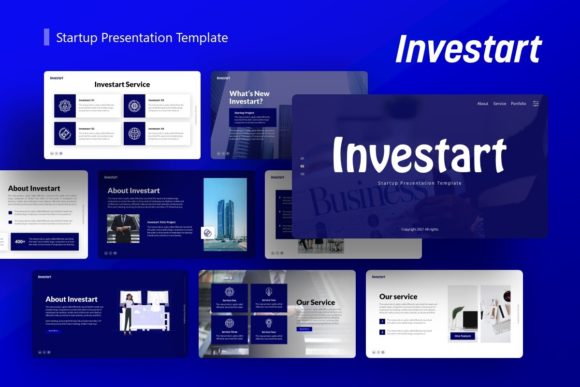
Investart Presentation Template: A Versatile Design Tool
Creating a compelling pitch deck or corporate profile often feels like a battle between content and design. You have the data and the narrative, but translating that into a visually cohesive story takes hours of formatting, aligning, and resizing. This is where the Presentation Template - Investart bridges the gap between professional aesthetics and practical utility. Designed with versatility at its core, this template serves as a comprehensive foundation for anyone needing to communicate ideas clearly, whether you are a startup founder seeking seed funding or a creative agency showcasing a new campaign.
The true value of Investart lies in its adaptability. While many templates are rigidly themed around a single niche, this resource is engineered to function across multiple disciplines. It understands that a photographer’s portfolio requires different visual pacing than a SaaS company’s quarterly report, yet both demand high-quality typography and clean layouts. By providing a robust framework rather than a fixed aesthetic, it allows users to maintain brand consistency without starting from a blank slide.
Core Features That Drive Efficiency
When evaluating presentation assets, professionals look for more than just attractive preview images; they need functional architecture. The Presentation Template - Investart includes 36 distinct slides for each template variation, offering enough variety to construct a complete narrative arc without repetition. This volume ensures you have specific layouts for team introductions, financial projections, service overviews, and visual galleries.
A standout technical feature is the use of handcrafted infographics built directly within PowerPoint. Unlike static images imported from external design software, these graphics are native vector elements. This means every chart, diagram, and icon is fully resizable and editable without losing pixel-perfect clarity. You can adjust colors to match your brand guidelines instantly or modify data points without needing to recreate the graphic from scratch. This native integration significantly reduces the friction typically associated with updating complex visual data.
The template is also constructed using Master Slides. For those unfamiliar with advanced PowerPoint workflows, Master Slides act as a global style controller. Changing a font, logo placement, or background color on the master slide propagates that change across all relevant slides in the deck. This feature alone can save hours of manual editing, ensuring that your final output remains consistent even after multiple rounds of revisions.
Practical Applications Across Industries
The flexibility of the Introducing Investart Startup Presentation extends far beyond venture capital pitches. Its structure supports a wide array of professional and personal use cases:
- Startup Pitch Decks: Use the dedicated problem-solution and market size slides to articulate your value proposition to investors. The clean layout keeps focus on your metrics and vision rather than distracting design elements.
- Creative Agency Portfolios: Leverage the image-heavy slides and grid layouts to showcase case studies. The minimalist aesthetic ensures your creative work remains the hero of the presentation.
- Corporate Profiles: Utilize the timeline, mission statement, and organizational chart slides for internal training, partner onboarding, or annual reviews. The professional tone establishes credibility and trust.
- Personal Branding: Freelancers and consultants can adapt the portfolio sections to highlight services, testimonials, and past projects. It functions as a dynamic digital resume that stands out in client meetings.
- Educational Content: Educators and trainers can use the infographic slides to break down complex concepts into digestible visual chunks, improving retention and engagement during lectures or workshops.
In each of these scenarios, the template acts as a communication accelerator. Instead of debating whether a slide looks "right," teams can focus entirely on refining their message and strategy.
Streamlining the Design Workflow
Productivity in presentation design is often bottlenecked by asset management. The Presentation Template - Investart addresses this through intuitive usability features. The inclusion of drag-and-drop picture placeholders eliminates the guesswork of image sizing and cropping. Users simply drop their media into the designated frame, and the template automatically masks and positions it correctly. This is particularly valuable for non-designers who may struggle with aspect ratios or alignment tools.
Furthermore, the package includes a documentation file and a set of vector icons. Having a curated icon set that matches the template’s line weight and style prevents the common design error of mixing disparate visual languages. The documentation serves as a quick-start guide, helping users understand how to manipulate master slides and edit infographics effectively. This support structure lowers the learning curve, making professional-grade design accessible to marketers, educators, and business owners who may not have formal design training.
Important Considerations Before Implementation
While the Presentation Template - Investart is a powerful tool, maximizing its potential requires mindful implementation. It is crucial to note that all images shown in the demo previews are for illustrative purposes only and are not included in the downloadable files. Users must supply their own high-quality photography and branding assets. Relying on low-resolution or generic stock photos can undermine the premium feel of the template, so budgeting time for asset curation is essential.
Additionally, while the template is highly customizable, restraint is key. With 36 slides available, there is a temptation to use as many as possible. However, effective presentations are defined by what is left out. Select only the slides that directly support your narrative. A concise 15-slide deck using this template will always outperform a bloated 30-slide version that loses audience attention.
Users should also verify their software compatibility. Since the infographics and master slides rely on specific PowerPoint functionalities, ensure you are using a relatively modern version of Microsoft PowerPoint or Keynote (with potential conversion adjustments). Older versions or web-based alternatives may not render the editable vectors correctly, which could limit your ability to customize the content.
Elevating Communication Through Design
Ultimately, the goal of any presentation asset is to enhance understanding. The Presentation Template - Investart succeeds because it treats design as a functional component of communication rather than mere decoration. The pixel-perfect illustrations and resizable graphics ensure that information is presented clearly, while the master slide architecture guarantees professional consistency.
For entrepreneurs, creatives, and professionals, this template represents a strategic investment in how ideas are perceived. It removes the technical barriers to creating beautiful slides, allowing you to channel energy into storytelling and persuasion. Whether you are introducing a disruptive startup, profiling a mature corporation, or displaying a personal portfolio, Investart provides the structural integrity needed to make your message resonate. By combining aesthetic polish with deep editability, it transforms the daunting task of deck creation into a streamlined, efficient process that yields professional results every time.