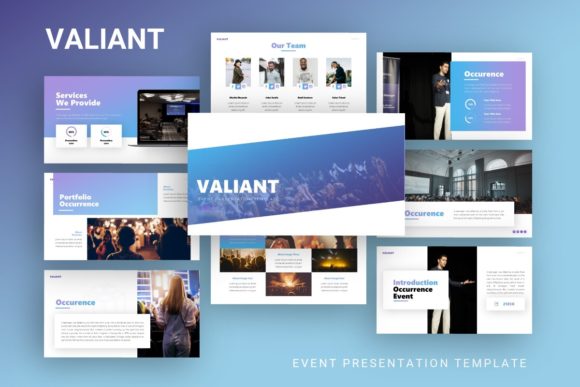
Presentation Template Valiant: Design for Impact
In the landscape of professional communication, the difference between a forgettable meeting and a compelling narrative often lies in visual structure. Presentation Template - Valiant addresses this gap by offering a design system that balances aesthetic sophistication with functional clarity. It is not merely a collection of slides; it is a comprehensive toolkit designed to streamline the creation process for creative agencies, startups, corporate teams, and individual portfolio builders. The template provides a foundational architecture that allows users to focus on storytelling rather than formatting, ensuring that the message remains the focal point while the design supports and enhances understanding.
A Foundation Built on Master Slides
The technical backbone of any effective presentation deck is consistency. Valiant is engineered using a robust Master Slide system within PowerPoint (.PPTX). This approach is critical for professionals who need to maintain brand integrity across thirty-five unique slides. When you adjust a color palette, font hierarchy, or logo placement on the master slide, those changes propagate instantly throughout the entire deck. This eliminates the tedious manual adjustments that often consume hours of preparation time and reduces the risk of formatting errors during high-pressure pitches.
Beyond basic consistency, the template features handcrafted infographics and pixel-perfect illustrations. These are not generic stock assets but purpose-built visual elements designed to communicate complex data clearly. Because all graphics are fully resizable and editable vectors, they remain crisp whether projected on a conference room screen or viewed on a mobile device. This scalability ensures that your pitch deck or company profile maintains a premium look regardless of the viewing context.
Adapting Valiant for Creative Agencies and Portfolios
For designers, photographers, and creative agencies, the visual arrangement of work is as important as the work itself. Presentation Template - Valiant offers specific layouts tailored for visual storytelling. The picture placeholders utilize a drag-and-drop functionality that respects aspect ratios and alignment grids, making it simple to swap demo images with actual project photography without breaking the layout. This feature is particularly valuable for personal portfolios where the goal is to showcase versatility while maintaining a cohesive curatorial voice.
Creative professionals can leverage the template’s minimalist aesthetic to let their work breathe. Instead of fighting against heavy decorative elements, users can utilize the clean negative space to guide the viewer’s eye toward key deliverables. For a photography portfolio, this might mean using full-bleed image slides interspersed with typographic case study breakdowns. For a branding agency, the infographic slides can be repurposed to visualize the strategic thinking behind a rebrand, demonstrating value beyond just the final logo.
Practical Application for Visual Storytelling
- Case Study Narratives: Use the structured content slides to walk clients through a problem-solution-result framework, replacing dense text with icon-driven timelines.
- Mood Boards: Utilize grid-based layouts to present initial concepts and aesthetic directions during early-stage client meetings.
- Service Menus: Adapt list and comparison slides to clearly outline retainer packages or project scopes without overwhelming potential clients with jargon.
Strategic Communication for Startups and Business
While creatives prioritize aesthetics, entrepreneurs and business leaders require clarity and persuasion. Valiant serves as an excellent vessel for pitch decks and corporate profiles because its design language conveys stability and modernity. Investors and stakeholders respond positively to organized information architecture. The included infographic slides allow founders to transform abstract market data, financial projections, and user growth metrics into digestible visual formats that support verbal arguments.
The thirty-five-slide count provides enough variety to cover every aspect of a standard business presentation without forcing unnecessary filler. You can select only the slides that serve your specific narrative arc. For a seed-stage pitch, this might involve combining the team introduction, market opportunity, and product roadmap slides into a tight ten-minute deck. For an internal quarterly review, the same template can be expanded to include detailed performance charts and strategic planning frameworks. The flexibility lies in the modularity; the template adapts to the depth of information required rather than dictating a rigid structure.
Enhancing Corporate Clarity
- Data Visualization: Replace standard Excel screenshots with native PowerPoint charts styled in the Valiant color scheme to maintain immersion.
- Process Explanation: Use step-by-step diagram slides to onboard new employees or explain operational workflows to partners.
- Vision Statements: Leverage high-impact typography slides to anchor mission statements or core values, creating memorable moments in otherwise dense presentations.
Customization Without Compromise
A common concern with pre-made templates is the fear of looking generic. However, Presentation Template - Valiant is designed as a starting point for original expression rather than a final destination. The inclusion of vector icons and editable shapes means that no two presentations need to look identical. Users should view the provided layouts as wireframes for their own ideas. Changing the primary accent color to match brand guidelines immediately shifts the mood of the deck. Adjusting font weights or swapping illustration styles can further differentiate the output.
It is important to note that while the template includes high-quality placeholder imagery for preview purposes, these images are not part of the downloadable files. This distinction is actually a benefit. It forces users to source or create authentic visuals that align with their specific message. Relying on the exact same stock photos as everyone else dilutes impact. By inserting your own photography, custom diagrams, or branded textures, you ensure the presentation feels bespoke and grounded in reality.
Best Practices for Effective Implementation
To maximize the utility of this resource, approach customization with intention. Before opening the .PPTX file, outline your narrative flow. Determine which of the thirty-five slides actively advance your story and delete the rest. A concise twenty-slide deck built on strong content is infinitely superior to a bloated thirty-five-slide deck filled with irrelevant templates. Organization breeds confidence, both for the presenter and the audience.
Pay close attention to the documentation file included with the download. Understanding how the master slides and graphic groups are layered will save significant troubleshooting time. When editing infographics, ungroup elements carefully to modify individual components without disrupting the overall composition. Maintain adequate padding around text and images; white space is an active design element that improves readability and cognitive processing. Finally, always test your presentation on the actual display equipment you intend to use. Colors and contrast can shift between monitors and projectors, and verifying legibility in the target environment is a non-negotiable step in professional delivery.
Ultimately, Presentation Template - Valiant succeeds because it respects the user's time and intelligence. It removes the friction of starting from zero while providing enough creative latitude to produce something distinctly yours. Whether you are securing funding, showcasing a creative portfolio, or reporting to a board of directors, this template offers the structural reliability needed to communicate with authority and style.