Menu Icons Set: Enhancing Digital Dining Experiences
In the rapidly evolving landscape of digital design, clarity and visual communication are paramount. For restaurants, food delivery platforms, and culinary blogs, the user interface serves as the digital storefront. A critical component of this interface is the Menu Icons Set, a specialized collection of vector illustrations designed to bridge the gap between textual content and visual recognition. When users navigate a food list on a mobile app or website, they rely heavily on iconography to process information quickly. This article explores the practical application, technical versatility, and strategic value of integrating a solid line style menu icon set into modern web and UI design projects.
The Role of Visual Semantics in Food Lists
The concept of a restaurant food list has transcended physical paper menus to become a dynamic digital experience. However, the fundamental challenge remains the same: helping customers make decisions efficiently. Text-heavy interfaces can cause cognitive overload, particularly on smaller mobile screens. This is where a dedicated Menu icons set vector illustration becomes an essential asset. By utilizing recognizable symbols for categories such as appetizers, main courses, beverages, and dietary restrictions, designers create a visual hierarchy that guides the user’s eye naturally through the content.
Solid icon line styles offer a unique advantage in this context. Unlike purely filled silhouettes which can sometimes appear heavy or lack detail at small sizes, or thin outline icons that may disappear against complex backgrounds, the solid line style strikes a balance. It provides enough visual weight to be immediately noticeable while retaining the internal detail necessary to distinguish a burger from a sandwich or a coffee cup from a wine glass. This stylistic choice is not merely aesthetic; it is functional, ensuring accessibility and legibility across various device resolutions.
Technical Versatility and File Formats
One of the most significant strengths of a professional-grade Menu Icons Set is its adaptability across different design workflows. Designers and developers rarely work in a vacuum, and asset compatibility is crucial for maintaining project momentum. High-quality sets typically include multiple source files to accommodate various software preferences and output requirements.
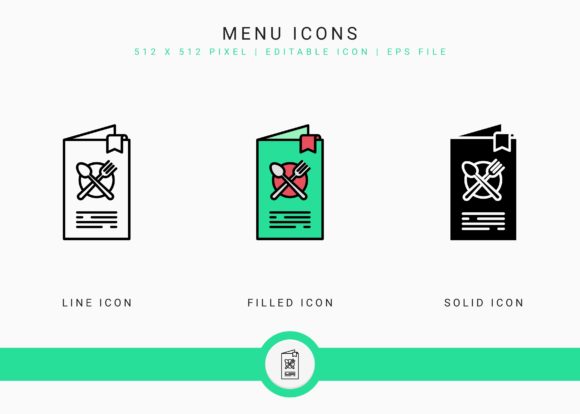
- Filled Line Icon SVG/EPS: Ideal for high-contrast interfaces and dark mode designs where bold visuals are required.
- Line Icon SVG/EPS: Perfect for minimalist aesthetics, clean white-space heavy layouts, and subtle UI elements.
- Solid Icon SVG/EPS: Best suited for primary navigation bars, active states, and focal points within the food list.
The inclusion of both SVG (Scalable Vector Graphics) and EPS (Encapsulated PostScript) formats ensures broad compatibility. While SVG is the gold standard for web implementation due to its code-based nature and infinite scalability without pixelation, EPS remains vital for print collateral and legacy design workflows. Furthermore, these editable stroke icons allow for granular customization. A designer can adjust the stroke width to match a brand’s specific typography weight or alter colors to align with a restaurant’s identity system directly within their vector editing software.
Software Compatibility and Workflow Integration
Accessibility extends beyond the end-user to the creators themselves. A versatile Menu Icons Set should be agnostic regarding the design tool used. Professional assets are optimized for industry-standard applications including Adobe Illustrator, Affinity Designer, Inkscape, and Gravit Designer. This cross-platform compatibility is vital for teams with diverse tech stacks or freelancers who may need to hand off files to clients using different software.
For those new to working with vector packs, proper file management is the first step toward efficiency. Upon acquiring the asset pack, it is imperative to extract and unzip the file immediately after download. Organizing the subfolders by style—Filled, Line, and Solid—at the beginning of a project prevents confusion later when searching for specific variations. Maintaining this organized structure also facilitates easier updates and version control as the design project evolves.
Practical Applications Beyond the Menu
While the primary nomenclature suggests use strictly for food lists, the utility of a comprehensive Menu Icons Set extends far beyond simple categorization. In the broader context of hospitality and service design, these assets serve multiple functions:
- Infographic Creation: Restaurants often need to explain processes, such as farm-to-table sourcing or preparation methods. Solid line icons provide a cohesive visual language for educational infographics displayed on digital signage or social media.
- Mobile App Navigation: Tab bars and hamburger menus benefit significantly from consistent iconography. Using a unified set ensures that the "Order," "Favorites," and "Profile" sections feel like part of the same family as the food category icons.
- Marketing Materials: Consistency builds trust. Using the same icon style in email newsletters, loyalty program apps, and physical table tents creates a seamless omnichannel brand experience.
- Dietary Communication: Clearly communicating allergens and dietary options (gluten-free, vegan, spicy) is a legal and ethical necessity. Standardized icons reduce ambiguity and improve safety for diners with restrictions.
Evaluating Suitability for Your Project
Not every icon set is appropriate for every project. When selecting a Menu Icons Set for a specific client or internal product, several factors must be weighed against the project's goals. The solid line style discussed here is particularly well-suited for brands that want to convey reliability and substance without appearing overly playful or cartoonish. It works exceptionally well for fast-casual dining, coffee shops, and delivery aggregators where speed of recognition is tied directly to conversion rates.
However, designers must also consider the density of information. If a food list contains hundreds of items, even the best icons can become visual noise if overused. Strategic restraint is key. Use icons for top-level categories and critical alerts rather than for every single menu item. Additionally, ensure that the chosen icons have been tested for accessibility. Color alone should never be the sole indicator of meaning; the shape of the solid line icon must be distinct enough to be understood by users with color vision deficiencies.
Customization and Brand Alignment
The true value of an editable stroke icon lies in its malleability. A generic icon set is a starting point, not a final destination. Successful integration requires tailoring the assets to the specific brand voice. For example, a high-end steakhouse might opt for thinner strokes and sharper corners in the Line Icon variation to convey elegance and precision. Conversely, a family-friendly pizzeria might increase the stroke width and round the corners of the Filled Line icons to evoke warmth and approachability.
Because these files are provided in vector format, scaling is never an issue. An icon designed for a 24px mobile tab bar can be scaled up to a 500px hero image for a landing page without any loss of fidelity. This scalability makes the Menu Icons Set a cost-effective investment, reducing the need to commission custom illustrations for different screen sizes or marketing mediums.
Maintenance and Future-Proofing
Digital products are living entities that require ongoing maintenance. As menus change seasonally, the icon set must evolve accordingly. Working with a structured set containing SVG and EPS files simplifies this process. Designers can easily duplicate existing icons and modify them to represent new dishes or categories while maintaining the established visual rules. This consistency is difficult to achieve when sourcing individual icons from disparate free resources.
Furthermore, as web standards evolve, having source files allows for future optimization. Newer SVG compression techniques or animation libraries may emerge, and owning the raw vector data ensures your assets remain compatible with cutting-edge web technologies. Whether implementing CSS animations for hover states or integrating with modern frameworks like React or Vue, the underlying vector geometry remains the foundation of performance and quality.
Conclusion
The integration of a professionally crafted Menu Icons Set is more than a decorative choice; it is a strategic decision that impacts usability, brand perception, and operational efficiency. By leveraging the solid line style, designers can create interfaces that are both visually appealing and functionally robust. The availability of multiple file formats and broad software compatibility ensures that these assets fit seamlessly into virtually any design workflow, from initial concept in Adobe Illustrator to final implementation in a mobile app.
Ultimately, the goal of any restaurant food list concept is to facilitate a connection between the diner and the cuisine. Thoughtful iconography removes friction from this interaction, allowing the food to take center stage. Whether you are building a complex delivery platform or a simple digital menu board, investing time in selecting and customizing the right vector illustrations will yield dividends in user satisfaction and engagement. Remember to manage your files correctly, test for accessibility, and treat the icon set as a flexible design system rather than a static library. With the right approach, these visual tools become indispensable assets in the modern digital hospitality toolkit.