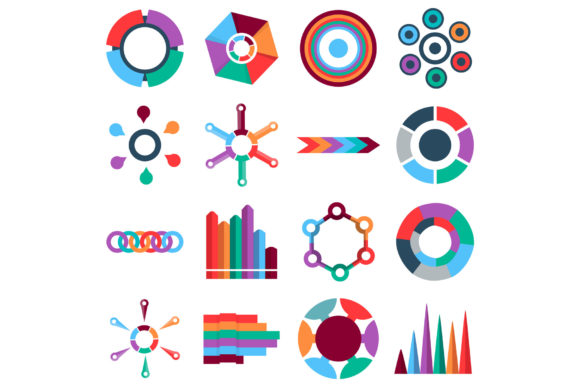
Flat Style Infographic Items Icons Set Guide
Visual communication often hinges on the ability to simplify complex ideas without losing their meaning. The Infographic Items Icons Set, Flat Style serves as a foundational toolkit for this exact purpose. Comprising 16 distinct vector icons designed with a clean, modern aesthetic, this collection moves beyond simple decoration to function as a structural element in digital and print design. Whether you are building a pitch deck, designing an educational worksheet, or updating a website interface, having access to high-quality, scalable assets in formats like AI, EPS, PSD, PNG, and JPG ensures that your visual narrative remains sharp across every medium.
Why Format Versatility Matters Across Skill Levels
One of the most critical aspects of evaluating any icon set is understanding how the available file formats align with your current workflow and technical proficiency. This specific collection offers a broad spectrum of options, but the value of each format shifts depending on who is using it.
For beginners and non-designers, the PNG and JPG files are often the primary entry point. These raster formats allow for immediate drag-and-drop functionality into tools like Canva, PowerPoint, or Google Slides. There is no need to understand anchor points or vector paths; the user simply needs a transparent background image that looks professional at standard screen resolutions. For this group, ease of use and speed are the dominant priorities. They are likely creating internal reports, social media graphics, or blog headers where pixel-perfect scalability is less important than rapid assembly.
Conversely, professional designers and agencies will prioritize the AI and EPS files. These vector formats are non-negotiable for commercial work because they allow for infinite scaling and complete customization. A professional might need to extract a single color from the brand guidelines and apply it to these infographic items, or combine elements from different icons to create a bespoke illustration. The inclusion of a PSD file also bridges the gap for those working primarily in Photoshop who still require smart object capabilities or layer-based editing without jumping into Illustrator. For experts, flexibility and long-term utility outweigh immediate convenience.
Diverse Applications for Creators and Educators
The "flat style" designation is not merely an aesthetic choice; it is a functional one that serves specific audiences differently. Flat design removes gradients, shadows, and textures to focus purely on shape and color, which enhances readability and reduces cognitive load.
Educators and Trainers
For teachers, corporate trainers, and e-learning developers, clarity is paramount. When explaining a process, timeline, or hierarchy, realistic or overly detailed icons can distract learners. The flat illustration style found in this set helps maintain focus on the information structure rather than the artwork itself. An educator creating a lesson plan on organizational charts or data flow will find that these 16 items provide enough variety to map out concepts without overwhelming students. Here, the priority is pedagogical effectiveness and presentation consistency.
Content Creators and Bloggers
Writers and digital marketers face a different challenge: engagement. In an era of short attention spans, breaking up dense text with relevant visuals is essential for retention. However, creators often lack the budget for custom illustrations. This icon set acts as a cost-effective bridge, allowing bloggers to visualize statistics, steps, or comparisons professionally. For this audience, the commercial value lies in the ability to produce high-quality featured images and in-article graphics that rival larger publications, all while maintaining a cohesive site identity.
Evaluating Quality and Commercial Viability
When selecting digital assets, business owners and freelancers must weigh the investment against potential returns. It is not just about whether the icons look good today, but whether they will remain useful as projects evolve.
- Scalability for Print and Web: Because the source files are vector-based (AI/EPS), small business owners can use the same asset for a business card and a large-format trade show banner without purchasing separate versions. This versatility directly impacts cost-efficiency.
- Brand Consistency: Freelancers managing multiple clients appreciate sets with a unified stroke weight and geometric logic. Using mismatched icons from different sources creates a disjointed user experience. This set’s consistent flat style ensures that disparate infographic elements feel like part of a singular system.
- Editing Potential: The ability to recolor vectors means the asset does not expire when a company rebrands. Instead of buying a new pack, a designer can update the existing library to match new hex codes, extending the lifecycle of the purchase.
Matching the Asset to Your Specific Goals
Determining if the Infographic Items Icons Set, Flat Style is right for you requires an honest assessment of your project scope and personal limitations. Not every project requires editable vectors, and not every user has the software to utilize them.
If your goal is rapid prototyping or internal communication, evaluate the set based on the preview images alone. Do the 16 included items cover the specific metaphors you need? If you frequently discuss growth, connectivity, or analysis, ensure those specific concepts are represented clearly in the flat style. If the set lacks the specific niche symbols you require, even perfect file formats won't solve your problem.
If your goal is commercial product development or client deliverables, verify the licensing and technical integrity before downloading. Test the AI or EPS file immediately upon acquisition to ensure layers are organized and paths are closed. Professionals should also consider whether the flat style aligns with current industry trends in their specific sector; while flat design is timeless in UI/UX, some luxury or heritage brands may prefer more ornate styling.
Practical Examples by User Type
- The Startup Founder: Needs to explain a business model to investors in a pitch deck. Uses the PNG files in Keynote to quickly build a slide showing revenue streams. Priority: Speed and clear metaphor.
- The UX Designer: Is designing a dashboard for a SaaS platform. Imports the AI file into Figma to adapt the icons to the app’s specific grid system and dark mode color palette. Priority: Technical precision and adaptability.
- The HR Manager: Creating an onboarding PDF for new hires. Uses the flat icons to make the employee handbook visually approachable and less intimidating. Priority: Tone and accessibility.
- The Hobbyist Crafter: Wants to create vinyl decals for organization bins. Uses the SVG or EPS capability (if converted) or high-res PNG to cut precise shapes. Priority: Clean lines and simplicity.
Making an Informed Decision
Ultimately, the value of this Infographic Items Icons Set, Flat Style is subjective to your role. Beginners should view it as a learning aid and a shortcut to professionalism, leveraging the ready-made PNGs to improve presentations instantly. Experienced creatives should view it as raw material, assessing the vector construction and layer organization to determine if it fits their production pipeline. Business owners should view it as a reusable asset class that supports brand consistency across marketing channels.
By understanding these distinct perspectives, you can move beyond generic descriptions and evaluate whether this specific collection of 16 vector icons solves your actual problems. Whether you prioritize the immediate utility of a JPG, the creative freedom of an AI file, or the layered control of a PSD, ensuring the tool matches the task is the first step toward effective visual storytelling. Take stock of your current software, your typical output formats, and your audience's visual literacy before integrating this set into your next project.