Mastering Visual Hierarchy: The Power of Isometric Pillar Infographics in Modern Web Design
In the rapidly evolving landscape of digital communication, capturing and retaining audience attention is perhaps the single greatest challenge for content creators, marketers, and web designers. We live in an era of information overload, where users scan pages rather than reading them word-for-word. To combat this fatigue, visual storytelling has emerged not just as a stylistic choice, but as a fundamental necessity. Among the various visual tools available, the pillar infographic rendered in an isometric style stands out as a uniquely effective method for conveying complex structures, foundational concepts, and hierarchical data.
Understanding what makes this specific combination of format and style so powerful requires us to look beyond mere aesthetics. It involves exploring how human perception works, why certain file formats matter in professional workflows, and how these graphics bridge the gap between abstract ideas and tangible understanding. Whether you are a business owner looking to explain your service model, an educator simplifying a curriculum, or a designer seeking versatile assets, mastering the isometric pillar infographic is a skill that yields significant returns.
Deconstructing the Concept: What is a Pillar Infographic?
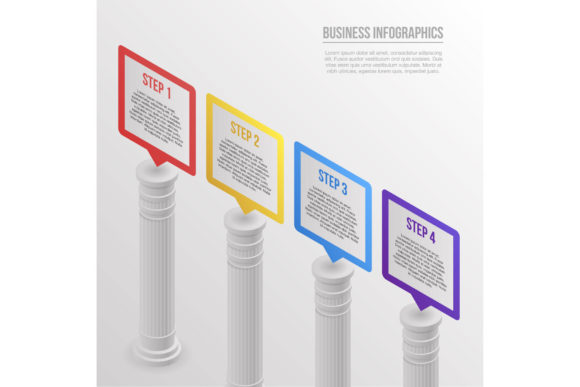
At its core, a pillar infographic is a visual representation designed to illustrate support, foundation, and structure. Just as architectural pillars hold up a building, these graphics visually represent the core elements that sustain a business strategy, a theoretical framework, or a product ecosystem. Unlike linear timelines or circular process diagrams, pillar infographics emphasize stability and interdependence.
When we apply an isometric projection to this concept, we unlock a new dimension of engagement. Isometric design is a method of visual representation where three-dimensional objects are depicted in two dimensions without perspective distortion. In true isometric art, the angle between any two axes is always 120 degrees, and parallel lines remain parallel. This creates a clean, technical, yet approachable aesthetic that feels organized and precise.
The combination is potent because it aligns form with function. The "pillar" suggests strength and reliability, while the "isometric" view suggests clarity and comprehensive oversight. For web design, this means presenting dense information in a way that feels spacious and navigable rather than cluttered and overwhelming.
Why Isometric Style Resonates with Modern Audiences
You might wonder why isometric vector art has seen such a massive resurgence in tech, SaaS, and educational sectors. The answer lies in cognitive processing. Traditional flat design, while minimalist, can sometimes lack the depth cues necessary to distinguish separate components in a complex system. Realistic 3D renders, conversely, can be too heavy and distracting.
Isometric design occupies the perfect middle ground:
- Cognitive Clarity: By removing vanishing points, isometric art allows viewers to compare sizes and relationships accurately. There is no foreshortening to trick the eye, making it ideal for comparing different "pillars" of equal importance.
- Modular Scalability: Isometric grids are inherently modular. Designers can add or remove pillars without breaking the composition, making these infographics incredibly adaptable for growing businesses.
- Professional Neutrality: The geometric precision conveys a sense of engineering and thoughtfulness. It implies that the subject matter has been carefully constructed, which builds trust with the reader.
- Visual Engagement: The pseudo-3D nature invites the eye to explore. Users tend to spend more time interacting with isometric scenes because they offer a satisfying sense of depth and discovery.
Practical Applications Across Industries
The versatility of the isometric pillar infographic extends far beyond decorative web headers. These assets serve functional roles across multiple domains, translating abstract value propositions into concrete visuals.
Business and Corporate Strategy
In corporate communications, explaining organizational structure or strategic priorities is often tedious. Text-heavy slides fail to inspire. An isometric pillar graphic can visualize company values as literal foundations supporting a roof labeled "Success" or "Growth." Service-based companies frequently use this style to show how different departments (Marketing, Sales, Support) act as individual pillars holding up the client experience. This visual metaphor instantly communicates that if one pillar fails, the entire structure is at risk, emphasizing the need for holistic alignment.
Education and E-Learning
Educators face the challenge of scaffolding knowledge. Isometric pillar infographics are excellent for displaying curriculum structures or historical frameworks. For example, a history lesson on democracy might depict three pillars representing the Executive, Legislative, and Judicial branches. Because isometric vectors are clean and uncluttered, they reduce extraneous cognitive load, allowing students to focus on the relationships between concepts rather than deciphering complex illustrations.
Technology and SaaS Architecture
Tech companies often struggle to visualize invisible software architectures. Isometric pillars can represent server stacks, security layers, or API integrations. Each pillar can symbolize a distinct module of a software suite, showing how they plug into a central platform. This helps non-technical stakeholders understand system robustness and integration capabilities without needing to read code or technical documentation.
Navigating File Formats: Choosing the Right Asset
For designers and content managers, understanding the technical specifications of these graphics is as important as understanding their visual impact. When sourcing or creating an isometric pillar infographic, you will typically encounter several file formats. Knowing when to use each is crucial for maintaining quality and workflow efficiency.
- AI (Adobe Illustrator): This is the native source file for vector graphics. It retains all editable paths, layers, and color profiles. If you need to customize the pillars to match your brand colors or change text labels, the AI file is essential. It is infinitely scalable without quality loss.
- EPS (Encapsulated PostScript): A universal vector format compatible with almost all vector editing software, not just Adobe products. EPS is the industry standard for sharing vector assets between different design teams or printing vendors. Like AI, it scales perfectly but may lose some specific Illustrator-only effects.
- PSD (Photoshop Document): While primarily a raster format, many premium infographic templates include PSD versions with smart objects. This allows users who do not own Illustrator to edit text and colors within Photoshop. However, unlike pure vectors, PSDs have resolution limits and are less ideal for responsive web design.
- PNG (Portable Network Graphics): The go-to format for web implementation. PNG supports transparency, which is critical for isometric art that needs to float over colored backgrounds or gradients. Always export PNGs at 2x or 3x resolution for retina displays to prevent blurriness.
- JPG (JPEG): Generally the least preferred format for isometric infographics due to compression artifacts and lack of transparency. JPGs should only be used for photographic contexts or when file size is the absolute primary constraint. For crisp vector lines and solid colors, JPG compression often introduces unwanted noise.
Common Misunderstandings and Best Practices
Despite their popularity, isometric pillar infographics are sometimes misused. A common misconception is that more detail equals better design. In reality, isometric art thrives on reduction. Overloading a pillar with textures, shadows, and tiny icons defeats the purpose of structural clarity. The most effective designs use negative space and simple geometry to guide the viewer’s eye.
Another frequent error is inconsistent lighting. In isometric projection, light direction must remain constant across all elements. If one pillar casts a shadow to the right and another to the left, the illusion breaks, and the image feels disjointed. Maintaining a consistent light source is non-negotiable for professional results.
Furthermore, accessibility is often overlooked. While the graphic itself is visual, web designers must ensure that the information conveyed is also available to screen readers. Using descriptive alt text or accompanying HTML text ensures that the infographic enhances rather than replaces accessible content. Remember, the graphic is a supplement to your message, not a barrier to it.
Building a Broader Visual Literacy
Ultimately, integrating isometric pillar infographics into your repertoire is about more than just following a design trend. It is about developing a deeper visual literacy that recognizes how form influences comprehension. By leveraging the structural metaphor of pillars and the cognitive clarity of isometric projection, you empower your audience to grasp complex ideas quickly and confidently.
Whether you are downloading a pre-made vector pack in EPS and PNG formats or commissioning a custom AI illustration, the goal remains the same: to build a visual foundation that supports your message. In a digital world defined by fleeting attention spans, providing a stable, clear, and engaging visual anchor is one of the most valuable investments you can make in your communication strategy. As you move forward, consider how these structural visuals can transform your next project from a simple presentation into a memorable architectural experience for your users.